
NetMirror Old Version APK – Download Older Versions for Android
The update came, and something broke. Maybe the new NetMirror feels heavy on your old phone. Maybe the layout changed and the app you knew is gone. Maybe it was working fine yesterday and, after updating, it is not. Whatever your reason, you are now hunting for the old version — and that hunt has its own danger, because half the “old version” pages on the internet hand you fake buttons, wrong files, or a completely different app with the same name. This page does the job properly: the older NetMirror versions people actually look for, what to check before you touch any old file, how to verify it is real, and how to install it without making a mess of your phone.
✓ v3.0 Latest • 54.4 MB • Android 7.0+ • Free • No Root
NetMirror old versions (v1.2, v1.8, v2.0, v2.1, v2.5) are earlier builds of the same free streaming app. The current version is v3.0 (54.4 MB, Android 7.0+), and it is the only file we have checked ourselves. Before installing any older APK: download it only from a source you trust, scan the file, check its permissions, and remember you usually must uninstall the current version first — Android does not install an old version over a new one.
What Is NetMirror Old Version APK?
A NetMirror old version is simply an earlier release of the same app. Same idea, same job — free movies, TV shows, web series and anime in one Android app — but built at an earlier time, with the look and weight of that time.
Nothing about an old version makes it a different app. Think of it like last year’s model of the same phone. Some people prefer it because it suits their device. Some people land here because the newest build misbehaves on their phone. Both are normal reasons, and this page treats them normally — with one warning that runs through everything below: old files travel through many hands on the internet, so checking matters more here than anywhere else.
One confusion to clear on day one: there are two different apps called NetMirror online. Ours is the streaming app — the checked file is 54.4 MB, package name app.netmirror.netmirrornew. There is also a small movie-discovery app with the same name (about 28 MB on some stores) that only finds titles and shows rental options. If the “old NetMirror” you downloaded is near 28 MB and asks you to rent films, you have picked up the wrong app.
NetMirror Older Versions — List
These are the older versions people actually search for. We do not invent release dates or file sizes for old builds — no honest record of them exists — so this table tells you the one thing that matters: who each version suits.
| Version | Best For |
|---|---|
| v1.2 | Very old phones; the lightest, simplest build |
| v1.8 | Old phones that found v1.2 too bare |
| v2.0 | Users who liked the early layout |
| v2.1 | A step newer, still light on old hardware |
| v2.5 | The most searched old version — a good middle ground |
| v3.0 (Current) | The latest version — checked by us: 54.4 MB, Android 7.0+ |
A straight word about numbers higher than 3.0: you will see v3.2, v4.0, v5.0, even v6.0 advertised on other sites. Those numbers do not come with one matching, verified file — different sites show different sizes for the “same” version. Until a file can be checked, this page does not list it as real. If you ever download one, the verify steps below are not optional.
Why Do Users Look for a NetMirror Old Version?
Compatibility With Older Android Phones
New builds slowly leave old phones behind. If your phone runs an older Android or has little free space and memory, an earlier NetMirror build can simply fit better and open without a fight.
Familiar Interface
People learn an app with their thumbs. When an update moves everything around, the app you could use half-asleep becomes a puzzle. Going back to the layout your hands already know is a fair reason on its own.
Performance on Older Hardware
Older builds ask less of the phone. On a budget or ageing device, an old version can open faster, scroll smoother and crash less than the newest one — not because it is better software, but because it is lighter software on a tired phone.
Changes After an Update
Sometimes an update removes something you used, or adds steps between you and your film. If the change spoiled the app for you, the version just before that change is the one you want — usually v2.5 or whichever build you were happy with.
Before You Download an Old Version — Check & Verify
This is the most important section on this page. Old APK files are where the internet’s bad habits live. Five checks, every time.
Check the Source
Old versions are found on app repositories and old-version sites across the internet — names like APKPure and Aptoide come up again and again. A known name is a start, not a guarantee. Prefer pages that tell you the version and size clearly, and run from any page that hides the file behind three “download” buttons and a timer.
Scan the File Before Installation
Before you install any older APK, run it through a trusted scanner — your phone’s antivirus, or Play Protect, or an online file scanner where you upload the file first. Unofficial old files can carry changed code, hidden trackers or worse, and a two-minute scan is the cheapest safety you will ever buy.
Review Permissions
After download, before install, look at what the file asks for. The real NetMirror needs internet and network access to stream — that is the job. An old “NetMirror” asking for your contacts, messages, calls or photos is not this app, whatever its icon looks like. Delete it and walk away.
Be Careful With Fake Download Buttons
Old-version pages are famous for this trick: five big shiny buttons, four of them ads or other apps, one small real link hiding below. Slow down. The real download is usually a plain text link or a single button near the version name. If a “download” opens a strange store page or starts installing something else, cancel it — you tapped a costume, not a button.
NetMirror Old Version Mod APK: Why Extra Caution Is Needed
If the word “Mod” is attached, the file has been opened and changed by someone you do not know. Changed to remove ads, maybe — or changed to add things you cannot see. A modded old version is the riskiest file in this whole topic. If you cannot verify who changed it and why, the honest advice is to leave it alone and take the clean version instead.
Understanding Version Numbers
Version numbers are not decoration. In a number like 2.5, the first part is the big release and the second part is the smaller steps after it. Bigger number, newer build — that is the whole code. So v3.0 is newer than v2.5, and v2.5 is newer than v2.1.
Why does this matter when you are going backwards? Because the version you want is not “the oldest”. It is the newest old one that still behaves the way you liked — the build just before the change that pushed you here. Start one step back, not five.
What Does “Legacy Version” Mean?
“Legacy” is just a grand word for an old version that is no longer supported. A legacy NetMirror gets no fixes, no updates and no help if something breaks. That is the trade you accept when you choose it — it works as it worked then, frozen in its time.
What Does “APK Mirror” Mean?
A “mirror” is a second home for the same file. Big repository sites keep original APK files as they were released, so people can find older builds after the newest one replaces them. A mirror should mean an untouched copy — which is why the scan and permission checks above still apply. “Mirror” is a claim, not a certificate.
Old Version Compatibility Guide
The simple rule: your phone’s Android must be at or above what the app build expects. The current v3.0 needs Android 7.0 and above. Earlier builds were made for the Android versions of their own time, so they ask for less — which is the whole reason old phones and old builds get along.
Before choosing, check two things on your phone: your Android version (Settings > About phone) and your free space. Then pick the newest old version your phone carries comfortably. There is no prize for going older than you need.
Older Android Does Not Always Mean Older APK
Read that line again, because it saves people a wrong download. An old phone is a reason to try an old version — it is not proof you need the oldest one. Many “my phone is too old for NetMirror” cases are really storage-full or cache problems, and they fix in two minutes on the latest version too. Try the checks first. Downgrade second.
NetMirror Latest Version vs Old Version
| Point | Old Version | Latest Version (v3.0) |
|---|---|---|
| Interface | The older layout you may prefer | The current layout |
| Weight on phone | Lighter, kinder to old phones | Heavier, asks a bit more |
| Bug fixes | Frozen — no new fixes come | Gets fixes and updates |
| Features | Whatever existed back then | Everything up to now |
| File checking | You must verify it yourself, carefully | Checked file on this site (54.4 MB) |
| Best for | Old phones, update problems, old-layout lovers | Most people, most of the time |
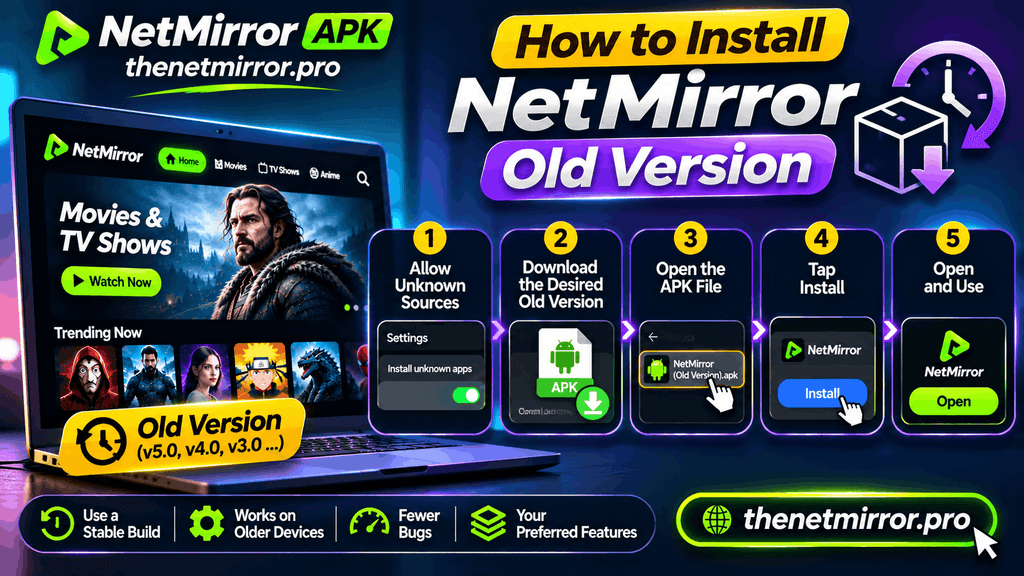
How to Install a NetMirror Old Version
The basic way is the same as any APK install, with one extra step in the middle that catches everybody.
Download the old version's APK from a source you trust, and finish the checks above — scan it, look at its permissions.
Save your watchlist if you care about it. The next step can clear the app’s local data.
Uninstall the current NetMirror first. Android will not install an older version over a newer one — it stops with an error. This is the step people skip, and then they blame the file.
Allow installs for one app only. Go to Settings > Security (or Privacy) and turn ON “Install unknown apps” for just the browser or file manager you are installing with — not for everything.
Open the old APK file and tap Install.
Turn the permission back OFF when you finish. The door did its job; do not leave it open for the next file that wanders in.
Open the app, let it load fully once on Wi-Fi, and check your film plays before you settle in.
Common Problems With Older NetMirror Versions
Installation Failed
Nine times out of ten, the current version is still on the phone (see step 3 above), or the file is half-downloaded. Delete the file, uninstall the current app, download fresh, and try once more.
App Keeps Crashing
Clear the app’s cache from Settings > Apps. If the crashes continue on that build, your phone and that version simply do not agree — move one version up or down instead of fighting it.
App Does Not Open
Restart the phone once before anything clever. Then check your free space — an app with no room to breathe often refuses to open at all. Free a few hundred MB and try again.
Features Do Not Work
Some things in an old build depend on services that have moved on since. A feature dead in v1.8 may simply be dead there forever. That is the known price of old versions: what works, works; what time has passed, stays passed.
Security Warnings
Your phone will warn you during any install from outside the Play Store — that warning alone is normal. A warning naming the file itself as harmful is different. Believe the second kind. Stop, delete the file, and take a cleaner source.
Old Version or Latest — Which Should You Choose?
Choose an Older Version When
Your phone is old or low on space and the latest build struggles. An update broke something or moved the layout you loved. Or one older build simply ran perfectly on your exact phone, and you see no reason to argue with that.
Prefer the Latest Version When
Your phone is from the last few years and runs the current build fine. You want the newest titles and fixes. Or you are installing NetMirror for the first time — a new user gains nothing by starting in the past.
Responsible Use — Short Note
Old versions are real software from real earlier days, and they deserve the same care as any file: honest sources, a scan before install, and no modded files from strangers. What you watch and the rules of the place you live in remain your own responsibility, on an old version exactly as on a new one.
Frequently Asked Questions
01Which NetMirror old version is the best?+
For most people, the newest old one — often v2.5 — because it keeps the old feel with the fewest old problems. If your phone is very old, step down to v2.0 or v1.8. The right answer is the newest build your phone runs happily.
02Is NetMirror old version really free?+
Yes. Old versions are free just like the current one. There is no charge and no sign-up in any real build. A page asking you to pay to “activate” an old version is not selling NetMirror — close it.
03Can I install an old version over the latest version?+
No. Android blocks installing an older build over a newer one. Uninstall the current version first, then install the old file. Your account is not an issue — NetMirror has no account — but your local watchlist can be lost, so note it down first.
04Are old versions of NetMirror safe?+
They can be, if you do the checks: trusted source, a scan before install, sensible permissions, and no “Mod” files from strangers. An old version gets no new security fixes, so your own checking carries more weight here than with the current version.
05How do I know the old file I downloaded is the real NetMirror?+
Match it against the real app: it should be the streaming app, sized in the same family as the current 54.4 MB file, with the package name app.netmirror.netmirrornew, asking only for internet and network permissions. A ~28 MB file that shows rental prices is a different app with the same name.
06Where do old NetMirror versions come from?+
App repositories and old-version archives on the internet keep earlier builds after new ones replace them — APKPure and Aptoide are the names people meet most. Treat every such file as unchecked until you scan and review it yourself, whichever name the site carries.
07Will an old version still work and show new movies?+
The app will open and its library can still load, but an old build is frozen in its time: no fixes, and some features or servers from its day may no longer answer. If too much is dead, that is your sign to move up a version.
08Can I go back to the latest version later?+
Any time. Uninstall the old build (or simply install the current v3.0 file over an older one — going up is always allowed), and you are back to the latest. Nothing locks you into the past.
Final Words
An old version is not a step down. For the right phone and the right user, it is the version that simply works — lighter, familiar, and free of whatever the last update broke.
Take it from a clean source. Scan it. Check it. Install it the one correct way. Do those four things, and your old NetMirror will feel less like a downgrade and more like coming back to the app you actually liked.